navlog-viewer
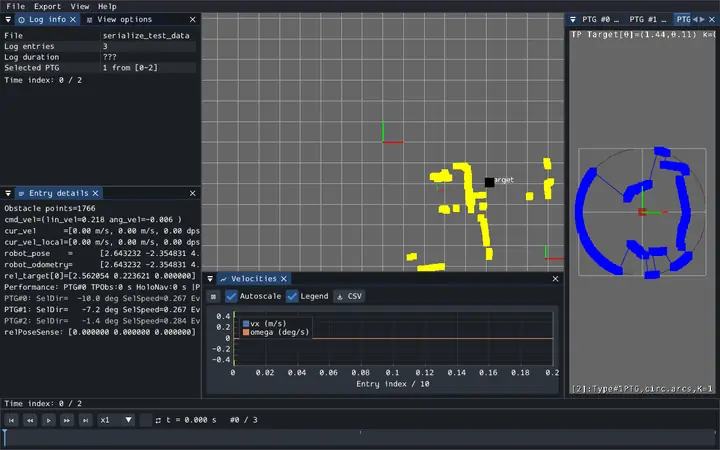
Viewer of the logs recorded by MRPT reactive navigators (mrpt::nav::CAbstractPTGBasedReactive, *.reactivenavlog files): one mrpt::nav::CLogFileRecord per navigation step.
navlog-viewer [log_file.reactivenavlog] [--load plugin.so]
User interface
The world view (robot, obstacles, selected path and its robot shapes, targets, past poses and delay-model poses) is the background of the main window. A timeline at the bottom moves through the log entries (in real time, if the entries have timestamps): play/pause, step, speed, loop, or click anywhere on it. Dockable panels:
Log info : file, number of entries, duration, selected PTG.
View options : raw odometry vs. global coordinates, delay-model poses, robot shapes along the selected path, number of past poses, debug fields, mouse coordinates, 2D orthographic mode, what to draw for each PTG.
Entry details : the values of the current log entry (velocities, poses, targets, per-PTG evaluation, timings, and all debug fields if enabled).
PTG views : the TP-space of each PTG (TP-obstacles, scores, selected direction, targets).
Velocities : robot linear and angular velocity along the whole log, with a cursor at the current entry (drag it, or click on the plot, to seek).
Manual pick : pick a PTG and trajectory by hand and append it, with the current entry, to
nav-selected.yaml.
The Export menu saves the PTG parameters, the current obstacles, MATLAB scripts with the map plot or the paths information, the score matrices, the current entry as a single-entry navlog, and a localization vs. odometry report.
Keyboard
Key |
Action |
|---|---|
Space |
Play / pause |
Left / Right |
Previous / next entry |
PageUp / PageDown |
10 entries backward / forward |
Home / End |
First / last entry |
Ctrl+O |
Open a log |
F1 |
About |